Back to work
🧠

Tredence · UX Designer · Enterprise B2B SaaS · AI/ML Development Platform

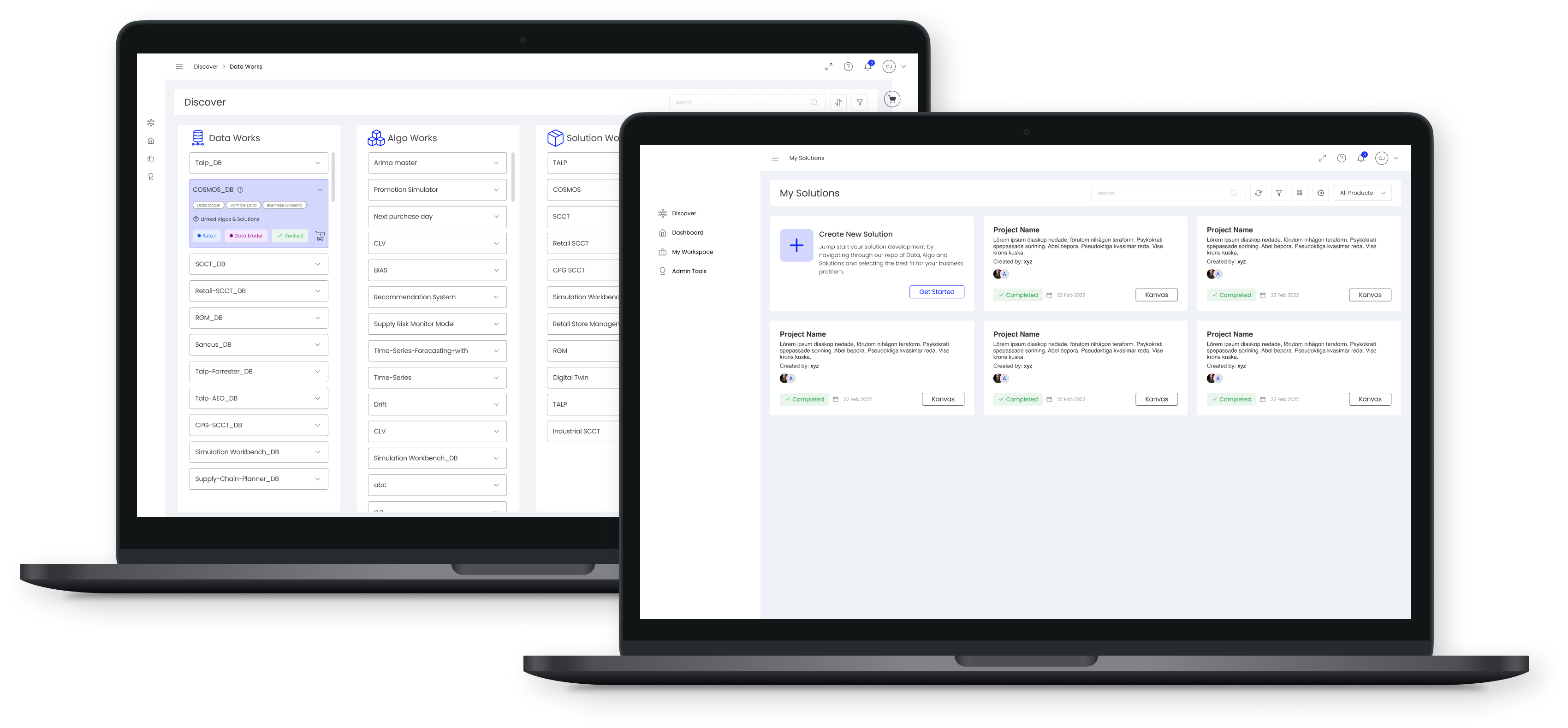
Enterprise AI Ecosystem

I designed an AI/ML ecosystem that helped enterprise teams build models faster using templates, pre-trained algorithms, and guided workflows.

Challenge

Enterprise teams spent 3 to 4 weeks building AI models from scratch, and many projects stalled before production. I needed to reduce setup friction, make reusable tools easier to find, and help non-technical users build with more confidence.

50%

faster time-to-value

40%

improvement in first-time success

67%

users started with templates

$1.8M

combined client savings

Illustrative artifacts

A product story with tangible surfaces.

These panels explain the design decisions around the supplied project surfaces.

💻
mock ui

4-step AI workflow

1Data integration
2Algorithm selection
3Training
4Deployment

Illustrative portfolio artifact based on the case-study narrative, not a direct client screenshot.

🧭
flow

Template-first creation

1Choose use case
2Connect data
3Train model
4Deploy API

Illustrative portfolio artifact based on the case-study narrative, not a direct client screenshot.

✨
Iteration

Algorithm language

Before

XGBoost Regression Model

After

Predict Sales Revenue

Illustrative portfolio artifact based on the case-study narrative, not a direct client screenshot.

01 · Context & Stakes

I designed a platform for AI builders with different levels of expertise.

I worked as the UX Designer on an enterprise B2B AI/ML development platform. I partnered with Product, ML engineers, data scientists, frontend developers, and enterprise stakeholders across finance, healthcare, retail, and manufacturing.

The platform supported data scientists, ML engineers, and business analysts.

The goal was to help teams develop, deploy, and scale AI applications for business use cases.

The experience needed to support AWS, GCP, and Azure infrastructure for enterprise flexibility.

02 · Constraints & Risks

We kept advanced power features behind the simple path.

The main risk was designing for experts only and losing the broader enterprise audience. I helped the team prioritize the 80% use case while preserving advanced controls where they were truly needed.

We avoided a heavy hyperparameter tuning UI for the default flow and used AutoML recommendations instead.

We did not build a data labeling tool because clients already used specialized tools like Labelbox and Scale AI.

We skipped a blank-slate custom algorithm environment because most users wanted templates and customization.

We deferred advanced model monitoring and kept Phase 1 focused on time-to-deploy.

03 · Research & Discovery

AI projects were slow because users kept starting from zero.

I interviewed 15 stakeholders, observed 6 live model-building sessions, reviewed surveys from 45 users, and analyzed drop-off points in the existing platform. Most teams were spending too much time on setup instead of model logic.

The average time to build and deploy a first model was 3 to 4 weeks.

Users spent 60% of development time on infrastructure setup and data wrangling.

82% of users copied code from StackOverflow or GitHub to move forward.

45% of projects were abandoned because the workflow felt too complex or unclear.

04 · Key Decisions & Trade-offs

We designed around templates, plain language, and guided progress.

I led a 3-day workshop with Product, ML Engineering, data scientists, and business analysts. The team aligned on a platform strategy that reduced blank-slate work while still giving experts room to customize.

Ready-to-use templates covered churn prediction, sales forecasting, anomaly detection, and demand prediction.

Pre-trained algorithms helped reduce training time from 8 to 12 hours to under 1 hour.

The main workflow became 4 steps: data integration, algorithm selection, training, and deployment.

A visual low-code flow helped business analysts participate without needing deep ML knowledge.

05 · Design Solutions

Plain language made AI feel usable.

I explored a linear wizard, a modular dashboard, and a visual workflow builder. Testing showed that users wanted a guided path, but they also needed to go back and adjust data or settings without restarting. One major pivot came from template language. Users did not want to choose between technical model names first. They wanted to start with business outcomes.

The linear wizard gave structure, but needed flexible edit states for earlier steps.

The modular dashboard felt too open-ended for novice users.

The node-based workflow was visually interesting but too heavy for the primary use case.

The final direction used a guided card-based flow with customization available when needed.

Template names changed from algorithm labels to use cases like Predict Customer Churn and Forecast Sales Revenue.

Data connectors supported AWS S3, PostgreSQL, Snowflake, Salesforce, Google Sheets, and CSV upload.

Training screens showed a simple Good, Fair, or Poor performance signal before advanced metrics.

Deployment included one-click cloud deployment, generated API endpoints, and a test prediction surface.

06 · Testing & Iteration

Making system state visible removed a surprising amount of confusion.

In Round 1 testing with 8 users, selected assets felt invisible, algorithm names felt intimidating, and non-technical users did not know whether training results were good enough. The redesign made selections, language, and confidence signals much clearer.

I added a persistent asset sidebar showing selected data, algorithm, and solution configuration.

Algorithm cards used business-language names with technical model names as secondary context.

Training metrics were simplified by default, with advanced metrics available for data scientists.

Round 2 reached 100% task completion, and 11 of 12 users said it was easier than competitor tools.

07 · Outcomes & Impact

The platform made AI development faster and more accessible.

The 8-week pilot included 25 enterprise users across 3 client organizations and internal data science teams. Users included data scientists, ML engineers, and business analysts building real AI applications.

Time-to-first-model decreased from 3 to 4 weeks to 6 days.

First-time success improved from 62% to 87%.

67% of users started with templates, validating the template-first approach.

45% of pilot users were business analysts, compared with 12% in previous tools.

08 · Reflection

AI becomes more useful when the interface starts with the business problem.

This project taught me that making AI accessible does not mean removing power. It means giving people a clear starting point, understandable language, and visible feedback as they move through complex work.

Templates beat blank slates when enterprise teams need faster adoption.

Plain language unlocks non-technical participation in AI workflows.

Progressive disclosure can serve business analysts and expert data scientists in the same product.

If I restarted, I would test with client users in Week 3 instead of Week 7.

Tools and learnings

Built through craft, constraints, and handoff.

Tools

FigmaAdobe XD

Outcomes

Time-to-first-model decreased from 3 to 4 weeks to 6 days

Time-to-value improved by 50%

First-time success improved from 62% to 87%

67% of users started with templates